Onsite ERP


Overview
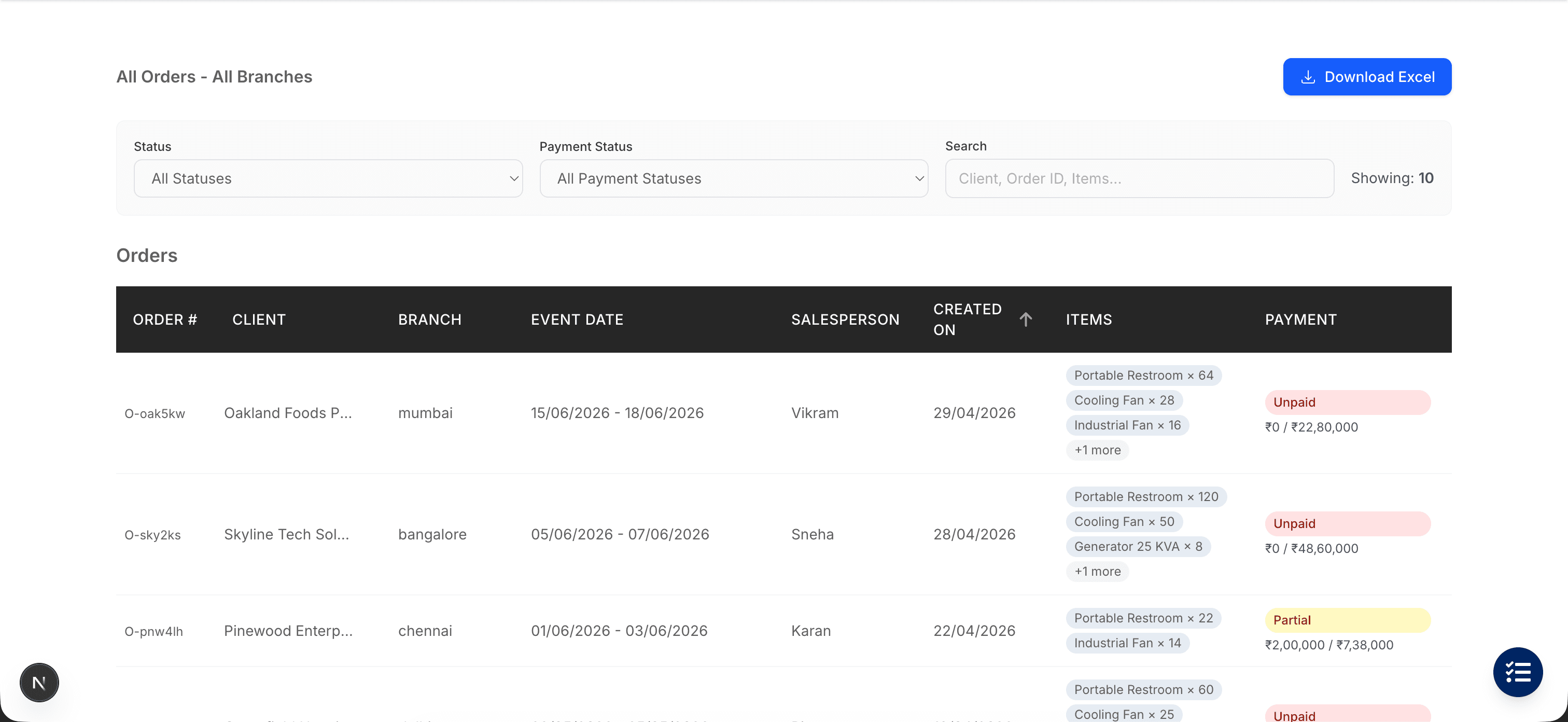
An end-to-end ERP for a 7-branch distribution operation. 5 user roles, 10 connected modules covering the full lifecycle from a quotation being raised to an order being delivered and signed off. Quotations move through approval into orders without ever turning into duplicates. Inventory is reserved by date range. Quality checks run as goods come back. Orders only close after the client confirms with a one-time code. The operations team sees what they need to do their job — never the money behind it.
At a Glance
10
Integrated Modules
5
User Roles
7
Branches Live
135+
Business Workflows
Key Features
Two Views of Inventory
What physically exists (available, in use, in repair, broken) is tracked alongside what's already promised out across future date ranges. Even when one rental ends the same day another starts, the system never double-books.
Quotations Become Orders, Cleanly
Once a quotation becomes an order, it's locked — no one can change or delete it. The same quotation can never accidentally become two orders, even if two staff convert it at the same moment. If something does need to change, there's a clean path back to the original.
Two-Step Approval
Orders above ₹4 lakh need admin approval; advance payments need accounts approval. Both can happen at the same time. Whichever lands second simply confirms the order — it can never be approved twice or skip a step.
Quality Check on Returns
Quality check starts the moment the first piece of equipment comes back — no waiting for the full order to return. Each item is moved into the right state (available, needs repair, broken) in a single step. If anything fails mid-way, nothing is left half-updated.
Client-Confirmed Completion
Orders only close after the client confirms. Operations generate a one-time 6-digit code (valid for 5 minutes), share it with the client, and the order completes once the client reads it back.
Dashboards That Hide What They Should
Five dashboards — admin, salesperson, operations, accounts, branch manager — each showing only what that role needs. Financial figures are kept out of the operations view in three separate places, so revenue can't leak through any path, even by accident.
Multi-Branch Orders
A single order can pull items from multiple branches. The salesperson owns the order but can only edit their own branch's items; every involved operations team is notified automatically.
Cancel and Reset
Orders can be cancelled before dispatch and the system unwinds everything in one step — reservations released, any inventory already moved is put back, the original quotation restored, approvals cleared, and everyone involved notified. Two staff cancelling at the same moment can't leave the order half-cancelled.
System Architecture
A modular system where every action — placing an order, approving a quote, moving stock — checks who you are and what you're allowed to do, updates the data, fires off any related changes (reservations, inventory moves, notifications), and refreshes everything you see, all in one step.
Auth & RBAC
Inventory + Reservations
Quotations
Orders
Delivery & QC
Tasks & Calendar
Notifications
Dashboard
Targets
Reporting
Technical Highlights
Originally built on AWS as 35 small functions; rebuilt as a single Next.js application — the system loads instantly even after hours of inactivity, and there's only one place to deploy
Two parallel views of inventory — what physically exists and what's already booked into the future. The math handles the tricky case where one rental ends and another begins on the same day, so equipment is never promised twice
10 connected data tables, each indexed for the queries that actually run — what does this branch have, what's pending approval, what's due tomorrow — without a single slow report
Two-step approval where both approvers can act at the same time. Whoever finishes second can't accidentally re-approve or revert the order
Financial figures are removed from the operations team's view in three separate places — the data layer, the screen, and the notifications they receive. Revenue can't leak through any path, even by mistake
Quality checks update inventory in a single step. If anything goes wrong mid-update, the entire change is reversed — no partial states, no drift between what's on the screen and what's actually in the warehouse
Next Step
Running an operation like this?
If you're wrestling with the same kind of complexity — multi-branch inventory, formulations, approval workflows — tell me about it. I'll respond within 24 hours with an honest assessment.
Start a conversation